Forbes contributors publish independent expert analyses and insights.
You're a keen gamer, but you also use Adobe Photoshop and Premiere for creating content. What kind of display should you get for your computer that has a fast enough refresh rate for gaming, but a native 4K UHD resolution and enough color gamut coverage for editing photos? It sounds like an impossible circle to square, but not if you choose a dual-mode monitor like the new KTC M27P6.
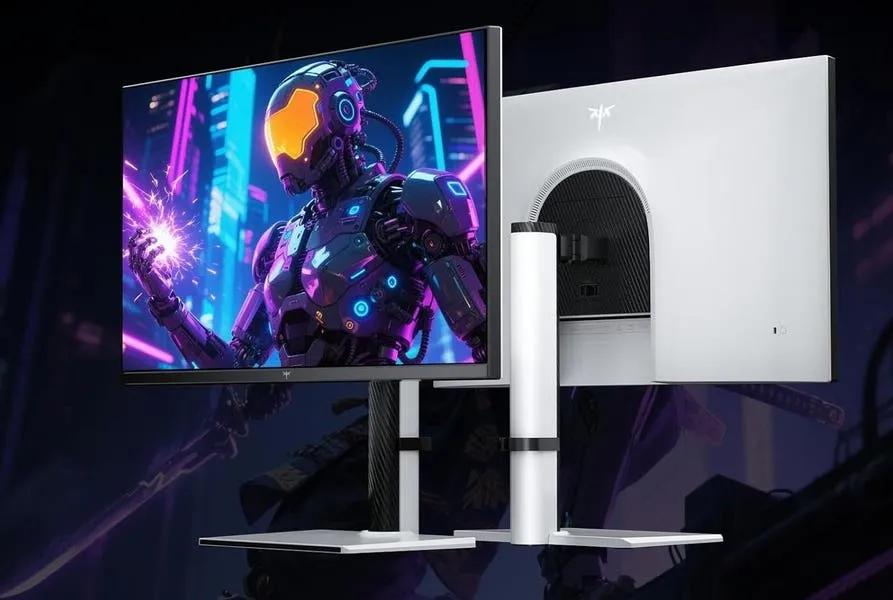
The KTC M27P6 is a 27-inch IPS monitor with 4K UHD resolution and a 160Hz refresh rate that can also be ramped up to 320Hz when the resolution is set to HD 1080. The backlight is a 1,152-zone mini-LED FALD, plus it the display has a built-in KVM so you can switch between gaming consoles and PCs with just one screen. Finally, the M27P6 offers a choice of inputs, including USB-C with DP Alt Mode and 65W of PD.
This dual-mode display has a quoted response time of 2ms and a viewing angle of 178 degrees. Color gamut coverage is 97% of Adobe RGB and the brightness level peaks at 400 Nits when used in Standard Dynamic Range mode. That figure rises to a quoted 1400 Nits when in High Dynamic Range mode.
With 3,840 x 2,160 resolution and just 27 inches of screen real estate to play with, the pixel density is high at 163ppi, which could make some apps display text in a very small font size, which could be difficult to read. Fortunately, most apps will let you scale or alter the display font size to make text more readable.
When it comes to color-critical applications such as image editing, the KTC M27P6 offers several display options that can be accessed using the OSD. There's a choice of color gamuts and settings including: Native, sRGB, DCI-P3, Adobe RGB and BT. 2020 plus a few others.
Each Professional Mode selects the appropriate settings for sharpness, gamma, hue/saturation and contrast, as well as locking onto the monitor's color gamut for that particular color space. You'll need to try them out to see which one works best for your needs, but it can save a lot of fiddling around with custom settings.
The backlights on this display are a mini-LED design with 1,152 of Full-Array Local Dimming zones or FALD. Each of the mini-LED backlights can be turned on or off, depending on the content being displayed. The advantage of using mini-LEDs is that it's possible to produce deeper blacks and brighter whites when running in HDR mode by dimming areas where you need more black or boosting power where you need brighter colors.
The screen's display has five local dimming settings. With the default Auto setting, you only get the dimming effect when the display is used in HDR mode. The M27P6 has four different settings: VESA DisplayHDR, HDR Game, HDR Cinema and HDR600 with the last setting capping the brightness levels at 600 Nits which some people could find useful in very low ambient lighting.
When used in its native 4K mode, the KTC M27P6 has a maximum refresh rate of 160Hz. Many of us are used to using 4K screens with a refresh rate of just 60Hz, so this is something of a luxury and may show smoother video action. My Mac mini M2 Pro had no probem with the 160Hz refresh rate. When the screen is switched into Gaming Mode, the resolution automatically drops down to 1,920 x 1,080 and the refresh rate goes up to a maximum of 320Hz, if your graphics card can support that high a refresh rate.
There are many options and settings on offer with this display and they are all accessed using the OSD or On-Screen Display menu, which can be navigated using the mini joystick control at the rear of the screen. As a Mac user, I decided to test the M27P6 by installing an app called BetterDisplay and if you are a Mac user, it's worth checking out.
BetterDisplay is clever piece of software that can control all a screen's settings. It can detect the screen's Display Control Interface, this meant I was able to adjust brightness levels using the special display keys on my Mac keyboard, just as you can with an Apple-branded Display. It's a handy little piece of software and well worth the money for upgrading to the Pro version.
Physically, the KTC M27P6 offers a robust build quality and comes with a stand that provides up to 130mm of height adjustment. The stand can be rotated through 90 degrees for use in landscape or portrait mode; plus there is a -5 to 20-degree tilt and +/- 45-degree swivel. The display also has a 100x100mm VESA mount so you to attach it to a monitor arm or wall mount.
The M27P6 has matte surface; which is my preference because I work with my back to a window and shiny screen picks up too many reflections that are so distracting when trying to edit an image. The screen has wide choice of inputs including two HDMI 2.1 ports,a DisplayPort 1.4 and USB-C with up to 65W Power Delivery.
As well as the display inputs,the M27P6 has a 3.5mm stereo headphone jack and a USB 3.0 hub although there's no cable supplied for that and it's one of those chunky double USB-B types which most of us are unlikely to have.The display ships with an external multi-voltage power supply,mains lead,DisplayPort and USB-C cables.
If you can only afford one display for your computer and you want a 4K screen as well as a fast gaming screen with a higher refresh rate, then something like the KTC M27P6 could be the answer. It has plenty of features, versatile mini-LED backlighting with local dimming, good HDR performance and acceptable color fidelity for a non-specialist photo imaging display which could cost four figures.