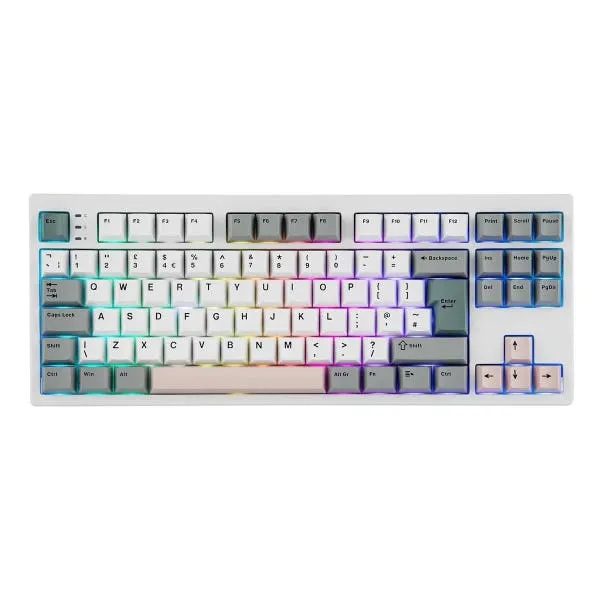
The more people who switch to using mechanical computer keyboards, the more the word spreads about how these kinds of keyboards are such a massive upgrade over the cheap and spongy membrane style keyboards bundled with many desktops and used in laptops. The TH87 is the latest mechanical keyboard from Epomaker and offers professional typing performance levels with minimalist aesthetics and tenkeyless layout.
This new keyboard is different as it has a large 10,000mAh rechargeable battery. Many mechanical keyboards have a 4,000mAh battery at most, so the TH87 is designed to work for longer between charges. The design has a gasket structure for precision and comfortable typing, whether you are gaming, coding, or writing.
With its compact tenkeyless layout, the TH87 TKL keyboard has the essential keys necessary for typing but still offers a comfortable spacing which should make it easier to get used to if you normally type on a 100% layout. With a smaller keyboard taking up less space on the desk surface, there's more room to wield a mouse. Described as "functional and stylish," this 87-key gaming keyboard has a clean and clear design with keycaps finished in gray, soft teal and light blush, striking an elegant pose.
Thanks to the massive 10,000mAh rechargeable battery, the TH87 wireless keyboard can run for up to 45 hours of continuous use with the RGB backlights set to their maximum brightness levels. This makes it suitable for those all-night gaming sessions. With the backlight switched off, the TH87 can function for up to 200 hours between charges.
When it comes to connectivity, the keyboard can connect with multiple devices using three different methods. As you'd expect from a wireless keyboard, the TH87 supports Bluetooth and it can pair with and switch between three different Bluetooth hosts. This is useful if you work on more than one device. You might have a gaming PC and a work Mac, which you can easily switch between.
The other two connection methods are plain old USB-C cable or the 2.4GHz wireless dongle, which comes with the keyboard. Using 2.4GHz wireless connectivity enables the TH87 to have a wireless polling rate of 1000Hz and a latency of just 5ms, compared to 11ms with Bluetooth. The ultra-fast 2.4GHz wireless delivers almost the same performance as using a USB cable to connect.
Epomaker says it has designed the TH87 to deliver "the ultimate typing experience in sound, comfort, and feel." The creamy feel and thocky sound of the TH87's keys are achieved using five-layers of sound-optimizing materials that absorb shock, suppress hollow noises and eliminate metallic pings. The gasket design provides a softer typing experience, while the Cherry profile PBT keycaps have an ergonomic feel. The keyboard also has adjustable kickstands with three typing angles for a more comfortable feel in the wrists.
The TH87 has RGB backlighting behind every key with south-facing LEDs that are fully adjustable in terms of their saturation, brightness and effect speed. You can set critical keys to a contrasting color to improve your reaction time when gaming. Alternatively, you could use the dynamic lighting effects to create a more personalized look for your keyboard.
The TH87's mechanical switches are Epomaker's silent Sea Salt type and they are also hot-swappable. This means they can be exchanged for another type of switch should you want a different feel or more key noise.
It's possible to assign complex key sequences to a single macro key or else remap rarely used keys to some more useful shortcuts by using Epomaker's programmable keyboard software. Unfortunately, that software is currently only available for Windows, so do keep that in mind.
Finally, this compact keyboard is available in a range of layouts. As well as the usual ANSI layout used in the U.S., the TH87 is also available with an ISO layout with German and UK English keys. Incidentally, if you're a UK-based Mac user and you want a TH87 with a British layout including a £ sign, bear in mind that the layouts are different for macOS and Windows with the @ sign and quotes switched around. I'd suggest opting for an ANSI layout instead and just get used to using # key for the £ symbol.